Local W3C validator on OSX
You may have noticed the W3C was asking for contributions for the running the validator. There is a way that you can support the W3c validation service - by not using it. The public version that is. (This is a slightly misleading statement, but I'll leave it for the purpose of the article). If you use OSX, you can install it locally.
You can run it as a program by installing the Validator SAC:
Validator S.A.C. (Stand Alone Complex) is a stand-alone, easy to install, version of the W3C's HTML / XHTML Markup Validator for Mac OS X.
Even better, you can install it as a local 'service', essentially a web application running on Apache on your local machine. That means you can adjust the Web Developers Toolbar for Firefox to use you local version. In the 'options' of the toolbar, go to the 'tools' options and adjust the URL of the HTML validator.
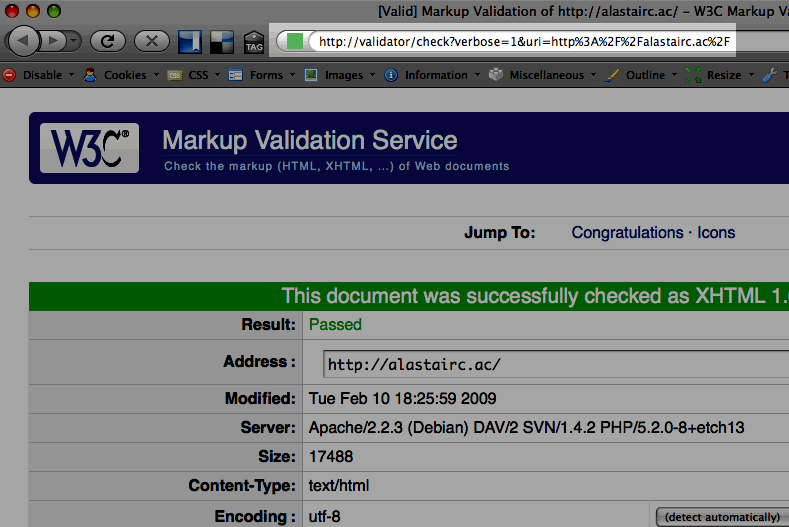
It's pretty straightforward to setup as a local website, especially if you use Apache locally on OSX. (My setup is a little more complex, but the principle is the same).
If you've adjusted your hosts file to include http://validator/, you just need to wrap the supplied file in a VirtualHost setting and setup your Apache config to use that.
This allows you to check local sites behind firewalls (or just on your own laptop), and to save the W3C some bandwidth, so I'd encourage standards aware developers using OSX to give this a go.
- ← Previous
Home links verses logos - Next →
Window click throughs and scrolling