WYSIWYG editors spec - Importing CSS
The second building block of a modern WYSIWYG editor is how the styles are defined and added for the structural HTML.
The output is easy to define, building on what HTML should be allowed: Styles must be applied by class to standard HTML.
What is not so easy to define is how the CSS should get into the editor, and how it is used. This aspect underpins the ATAG checkpoint: Help the author create structured content and separate information from its presentation. It is also a vital part of the customisation process when installing an editor, as the content edited should also look right.
The CSS need not be used whilst editing, you could have a fairly bland editing environment that only deals with structural HTML and does not style it:

However, this is not very "WYSIWYG", and if custom styles are applied it's difficult to tell. What you really want is for the editor to read the CSS and use that whilst editing.
There are several broad options on how that could be done, the editor could:
Use a separate style sheet or configurations
One method is to use specific customisation to show/use particular class and styles, e.g. use a special style sheet that you create for the editor. This style sheet would roughly match your main styles, but is aimed purely at the editor. The editor could then draw the options for classes from that file.
Use parts of the main styles
The editor would load the standard CSS file(s) and look for particular aspects within the standard CSS file. There are a few ways this could be accomplish, such as:
- Using anything that begins with
#content(or whatever specified). Then a class like#content .alignleftwould add an 'alignleft' option for styles. - The editor could load the style sheets and look for comments to show which styles to use. E.g.
/* [editor styles start] */
The styles after this comment would then be used by the editor, and any class found would be added to the options in the editor.
Use all the CSS
The editor would load the standard CSS file(s) and use them wholesale, making all the classes found available in the editor.
Dynamic style drop-down
Whichever of the above methods is used (and there are probably more), the ideal would be to only have relevant styles available depending on what element is currently selected.
For example, if there is a style called "square-bullets", which is intended to change the bullet used in ul elements, then it would only be available if you have a list selected.
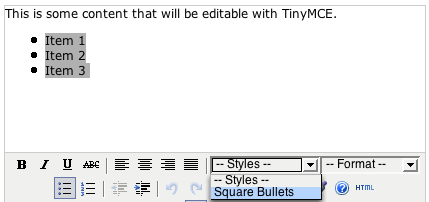
TinyMCE
TinyMCE allows quite a few of the options outlined. Using all the CSS is probably the quickest option for the developer, but it has some drawbacks as you can see from the result for this site:
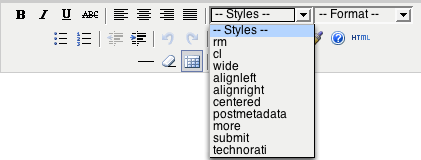
Only half of the classes I would actually want to appear, the rest are for template elements. Adding a style sheet (configuration) isn't enough in itself.
You can override this behaviour in TinyMCE, by using the advanced styles configuration. This overrides the style sheet classes so that you can select a sub-set of classes to include.
Overall
TinyMCE can load a separate style sheet, or it can use all the CSS and you can over-ride which styles are available to authors in the interface. However, if you do load all the CSS for a site (like this one), it is likely that it will not appear as intended, you would probably have to create an editor specific style sheet.
Also, TinyMCE is not restrictive in what element(s) you can apply a particular style to, so you could apply a style from the interface intended for images to other elements as well. (It adds a class to the element if the whole element is selected, or adds a span around sections of text.)
FCKeditor
Whereas TinyMCE keeps all the configurations in one file, FCKeditor has several separate files for styles. I removed quite a lot of the toolbar, and the edited the XML style file.
This XML file can be used to restrict the use of each style more than TinyMCE, for example this statement in the file:
<Style name="Image float Left" element="img">
    <Attribute name="class" value="alignleft" />
</Style>
The element="img" means that style will only be applied if an image is selected. This is a definite improvement, and if that drop-down hid irrelevant items dynamically, would be exactly how I envisioned the dynamic styles working. (Unfortunately it doesn't, all the styles are available all the time.)
FCKeditor allows you to add an external style sheet with a simple configuration:
FCKConfig.EditorAreaCSS = '/myownstyles.css' ;This style sheet is used to show styling whilst editing. It is not used to find classes to include in the styles drop-down, the XML file is the only source of selectable styles.
In common with TinyMCE, if you simply load a sites style sheet it probably won't appear as you intended, in the case of this site it's probably due to not having a <div id="content"> to get some of the inherited styles right:
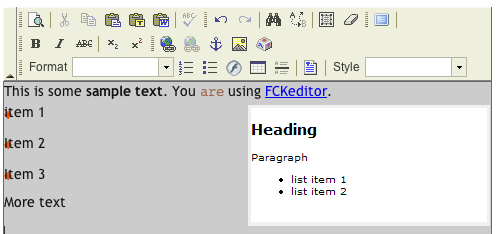
Without the option to direct the editor to specific parts of the CSS files, you would have to create a separate style sheet for the editor to use.
Overall
FCKeditor does well for a JavaScript based editor. The XML file format is slightly easier to edit than a JavaScipt configuration, and the mechanism allows a slightly more restricted application of the styles in the editor. Like TinyMCE, you would probably have to create an editor specific CSS file for it to display properly.
Xstandard (Lite)
Xstandard also allows the importing of a style sheet, because the editor loads is in object in the HTML page, you add a parameter to the object pointing to the style sheet:
<param name="CSS" value="http://myserver/format.css" />In a similar way to the other editors, you would want to create you're own style sheet for the editor, background images and colours don't often translate well:
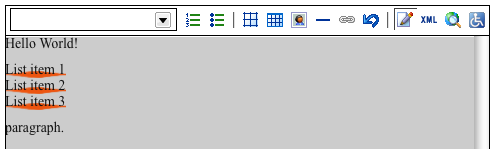
In common with FCKeditor, you can use an XML file to define what styles and to some extent the HTML that is available. This is two example style declarations:
<style>
  <label xml:lang="en">Bold</label>
  <elt>strong</elt>
</style>

<style>
  <label xml:lang="en">Highlights</label>
  <elt>strong</elt>
  <attr>
  	<name>class</name>
	<value>update</value>
  <attr>
</style>
(NB: The language attribute is because you can have several labels in different languages.)
In testing this works fairly well, I added the above styles and applied them to a paragraph, and sure enough, it came out as I would expect:
<p><strong>Bold text</strong> and
<strong class="highlighted">highlighted text</strong>.
</p>
Interestingly the definition for blockquote in the styles.xml does not mention anything about having a paragraph, but it is included in the output.
You can add and remove the buttons (list of default and optional buttons), but I can't see a way of editing what the buttons output (although this could be part of the 'pro' version).
If the user applies a block level style when only a word is selected, the whole paragraph will be changed. If you use a style intended for images, it removes the text and includes a default image holder.
Overall
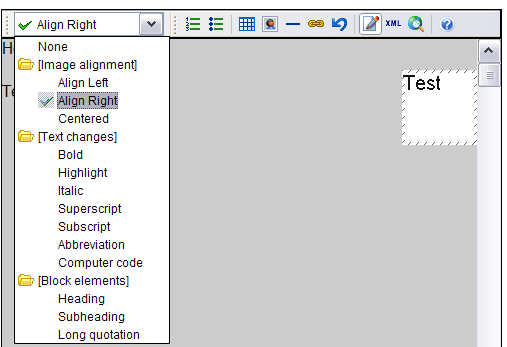
So long as you are happy working with the drop-down, Xstandard does allow good customisation and locking down of the styles. Personally, I would prefer to have a drop-down for block level HTML elements (headings, blockquotes, paragraphs, pre), buttons for inline elements (bold, italics, images etc.) and a drop-down for adding variations (i.e. styles). Xstandard tends to combine these:
Conclusion
Which editor is best for importing and controlling the styles available to authors?
There is no major conclusion to draw here, the editors all act in a fairly similar way. To get the editor to display the styles in WYSIWYG fashion, you need to supply it with a style sheet. In the case of this site at least, you would have to add a specific style sheet for that purpose.
Each allows you to customise what styles are available to the editor, the basic requirement.
Xstandard and FCKeditor have slightly different ways of restricting which styles are applied to what element. For example, if you apply a style intended for images to a paragraph, FCKeditor does not apply the style, whereas Xstandard will remove the text and add an place holder image. TinyMCE lacks this restriction and will add span tags with the class around text.
Although it's still very close at the moment, Xstandard is looking the best option so far due to the clean code output.
Technorati Tags:
- ← Previous
Captions vs subtitles - Next →
Future of web accessibility