Automated PDF accessibility testing
 I periodically receive emails from Sitemorse, despite trying to unsubscribe a couple of years ago. This one escaped my usual filters, and I noticed an interesting statistic about the number of accessible PDFs in the wild.
I've written about the four types of PDFs you get on the internet in general, and from experience with training people, I thought I had a pretty good idea of how many accessible PDFs would be available. However, Sitemorse have been running automated tests, and say that 74.8% of checked PDF's failed accessibility from the FTSE 100.
75%? [Insert rude word here.] Maybe three quarters of of the PDFs were tagged, but I'm very skeptical that any examination of those 25% of PDFs would show a real attempt at creating accessible PDFs (i.e. with alternative texts and good structure).
The report from Sitemorse was in PDF format, and included this little promotion:
SiteMorse now includes support for examining Adobe PDF files. We perform twenty eight (28) checks on PDF documents to ensure users do not experience problems such as broken links, or failing email addresses - we are also the first to test the accessibility compliance of PDF's.
(My emphasis.)
Now, I rarely check these things without being asked to, but I couldn't resist. How does this PDF stack up? Because PDF is a mostly binary format, you need a tool to check 'under the hood', but with Acrobat Pro it's quite easy to run a quick check. The results were actually worse than I expected:
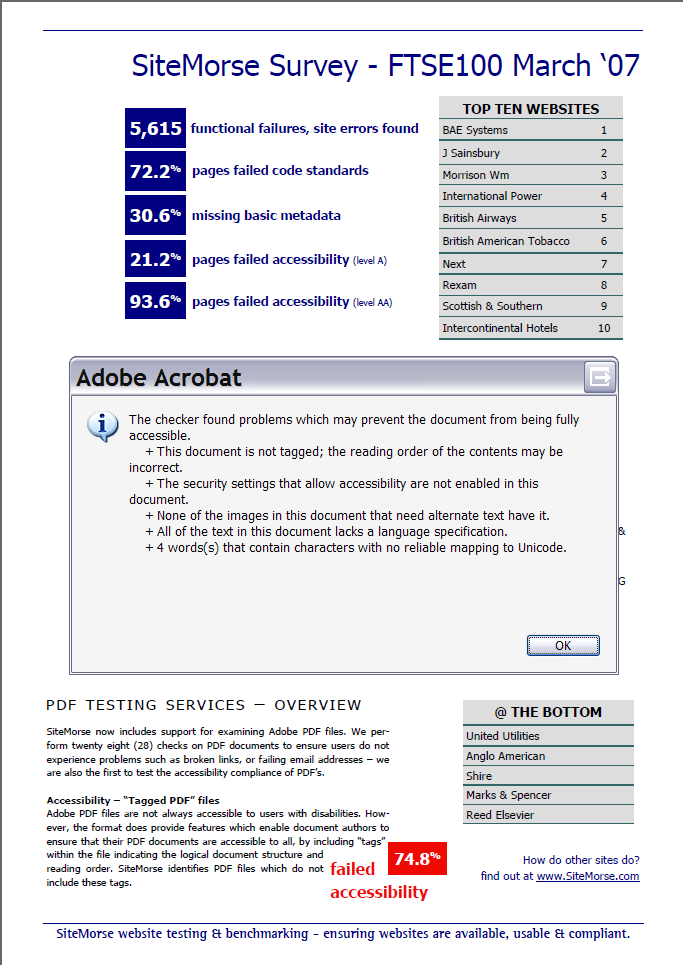
The report showed:
- It's not tagged, the most basic form of applying accessibility to PDFs.
- The security settings actively prevent accessibility.
- No images have alternative texts.
- The language is not set.
Now I would be the first to admit that accessifying PDFs can be real pain, and to do so you currently have to pay an Adobe tax, because no one else will create the tools (even though it's a published format and anyone can).
However, I don't understand why you would actively prevent accessibility?
The other main point is understanding what a 75% fail rate means. I'm guessing that the Sitemorse tool checks whether a PDF is tagged, and possibly whether images have alternative text. I'd be quite surprised if there were any other accessibility oriented checks, so it actually means 25% might be accessible.
Still, without knowing exactly what a tool checks, you can never know what the numbers mean.
Update - 22nd July '07
The last Sitemorse newsletter I recieved did not include a PDF (too hard to do perhaps?), and now the notes on PDF include:
SiteMorse identifies PDF files which do not include these tags.
This pretty much confirms the observations on pass/fail rates above, if there were other checks I'm sure they would be boasted about.
- ← Previous
SharePoint 2007 accessibility - Next →
Domain woes