Galleries in Wordpress 2.5
 The recent (and quite significant) overhaul of Wordpress' admin area is very good, streamlining your blogging and making previously diffiicult things quite simple. They are suffering from a slight case of the Office Ribbon (users not happy with the learning curve for a demonstrably better interface), but overall it is a big improvement.
One of the new features is the ability to automatically create a gallery within a post of all the picture uploaded to that post. I wasn't very happy with the code output for galleries, so I took it apart and tried to improve it.
Current process
To see how it works now, I uploaded a few photos, and included titles, captions, and descriptions in a way that I could see how they came out. I tend to have lots of windsurfing pictures lying around, so I picked half a dozen from an event last year to test with.
This is what you get after selecting a few files.
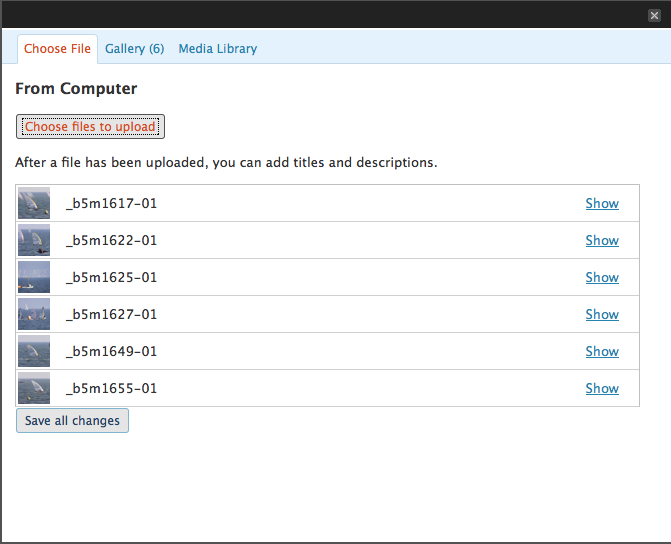
Once in, you can add the alternative text, a title, and longer description.
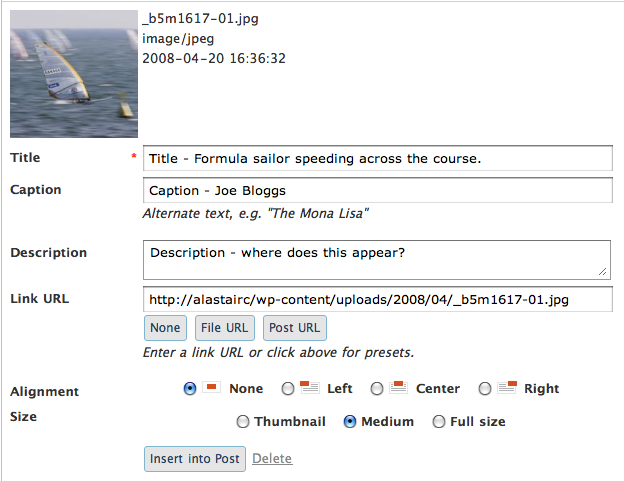
Inserting a single image into post
The code produced by simply inserting an image into the post is:
<p><a href="/path/_b5m1617-01.jpg">
<img class="alignleft size-thumbnail wp-image-289"
title="Title - Formula sailor speeding across the course."
src="/path/_b5m1617-01-150x150.jpg"
alt="Caption - Joe Bloggs"
width="150" height="150" />
</a></p>
Not bad, the title is added as a title, the 'caption' is the alternative text. I'm not sure if the standard use would need a title and caption, why not just use 'title' and use that as the alt? (As mentioned in the images part of my WYSIWYG spec.) Still, it's a nice implementation of having a longer description, as it creates a page for each item.
Adding a gallery
Adding a gallery is pretty easy: press the button. It doesn't add in the pictures into the editor, it simply adds a bit of text for gallery (in square brackets). The advantage to this approach is that how galleries are dealt with from a code point of view is handled when the page is rendered in PHP, rather than hard-coded by the TinyMCE editor.
However, the code when previewing the page is not what I had hoped for:
<style type='text/css'>
.gallery {
margin: auto;
}
.gallery-item {
float: left;
margin-top: 10px;
text-align: center;
width: 33%;			}
.gallery img {
border: 2px solid #cfcfcf;
}
.gallery-caption {
margin-left: 0;
}
</style>

<p>	<!-- see gallery_shortcode() in wp-includes/media.php --></p>
<div class='gallery'>
<dl class='gallery-item'>
<dt class='gallery-icon'>
<a href='path/_b5m1617-01/'
title='Title - Formula sailor speeding across the course.'>
<img src="path/_b5m1617-01-150x150.jpg" width="150"
height="150" class="attachment-thumbnail" /></a>
</dt>
<dd class='gallery-caption'>
Caption - Joe Bloggs
</dd>
</dl>
<dl class='gallery-item'>
<dt class='gallery-icon'>
<a href='path/_b5m1622-01/'
title='_b5m1622-01'><img
src="path/_b5m1622-01-150x150.jpg"
width="150" height="150"
class="attachment-thumbnail" /></a>
</dt>
</dl>
<!-- more lists for for each picture -->

<p><br style="clear: both" /><br />
<br style='clear: both;' >
</div>
Ok, so the main problems here are:
- Inline styling embeded into the page content.
- Invalid HTML. Open paragraphs tags without closing paragraph tags.
- Classitus, with each item being given a class, rather than using inheritance. (It is fair enough to put a
divwith a class around it, but it should just be plain HTML under that.) - No alternative text on the image.
- Each item is created with a list, a single item in each definition list. (A definition list is a slight stretch, but it would be ok if it was one list.)
It looks ok in my theme:

But I was unhappy enough with the code to start looking at how to change it.
Altering the Gallery code
The code itself gave me directions as to where to look, see gallery_shortcode() in wp-includes/media.php. This shows:
// Allow plugins/themes to override the default gallery template.
$output = apply_filters('post_gallery', '', $attr);
I looked into writing a pluggin that used a filter to override this, but either I just didn't get it (very possible, I'm not a programmer) or the gallery aspect is too new to be documented yet. Also, my understanding of the filters is that it changes the output, but I also want to include something that is missing - alt text.
I copied across the entire function, and two others that it relies on, into a plugin that overrides the shortcodes function set for the gallery.
I cut out the style tags, and adjusted it so the same gallery outputs this:
<ul class='gallery'>
<li><a href='path/_b5m1617-01.jpg'>
<img src="path/_b5m1617-01-150x150.jpg"
width="150" height="150"
alt="Caption - Joe Bloggs" />
</a></li>
<li><a href='path/_b5m1622-01.jpg'>
<img src="path/_b5m1622-01-150x150.jpg"
width="150" height="150"
alt="" /></a></li>
</ul>
<p><br class='cl' /></p>
It takes a little styling in your own CSS, but this is much better, more basic code. It looks pretty much the same, but it will drop to two columns if you are on a smaller screen.
If I could work out how, I would make it so that the title is added within each list item, so you would have:
<li>
<a><img></a>
<p>Title</p>
</li>
Anyway, if it is of use to you, the extension I created to do this is available: Gallery code clearner plugin. I'm not going to try and put it on Wordpress.org, I'll be submitting some bugs so that hopefully this can be changed in Wordpress.
Other little bugs
Whilst digging around in 2.5, I did find a couple of other bugs:
- The edit the URL (permalink) aspect is much better than 'page slug', but when you click 'save' next to it, you also have to know to save the post as well, otherwise it doesn't take effect.
- Titles are added to text navigation, for example, on the category links. This is somewhere between annoying (for regular users), and positively disruptive to people using screen magnifiers.
- When adding images, it adds the domain name, I would rather it used an absolute link without the domain name. E.g.
/path/to/image.jpgrather thanhttp://domain/path/to/image.jpg.
Update:
-
I wrote up the changes I'd like to see.
-
I submitted a bug about adding options for galleries in Wordpress settings.
-
I seconded this bug about lack of alt text and only using one short-description field in the interface.
-
I commented on this bug about how galleries are displayed, disagreeing with the use of multiple lists of 1.
-
There is another pluggin for a similar purpose which appears to make the addition of a lightbox easier (although I don't think it adds alt text).
- ← Previous
WCAG Samurai release errata - Next →
Why I don't buy DRM (music) products