Responsibility for accessible content
A simple rule for good web sites: content is golden. In an accessibility context, structured content is golden. It a core responsibility of the site owner to ensure this is followed (not just the developer). When you examine this issue, you can then understand why few organisations will ever produce accessible PDFs.
Content is golden
The simple principle is that you should create your content to last.
(X)HTML may have a limited set of elements to represent the vast array of content we want to put up, but it is important to use them, correctly. The separation of content and presentation underpins quite a lot of the accessibility guidelines, and is what enables people using different devices to access web content in different ways. The WCAG Samurai errata makes a more general and explicit expectation that you should know HTML and use the correct structure for your content.
Content, structure, presentation and behaviour
And yet, you often hear developers saying that you can't separate content and presentation, as the CSS hooks into the content. That's not entirely true.
The content and presentation are separate, however both are tied to the structure. The HTML structure with it's content becomes the foundation that you then layer on the presentation and behavior. Perhaps you might even layer on other technologies like Flash.
Making sure that your content is well structured to start with carries a lot of other advantages:
-
Re-use
If your basic content is well structured, clean (X)HTML, it becomes so much easier to transfer it.
For example, when handing over templates to a client's development team, I generally have a set of notes that I include as one of the pages in the templates. The base contents are the same for almost every client, but they receive them in the style of their own website because the content transfers over easily.
-
You can build functions later
Well structured source material makes it easier to add functions later.
For example, although no one could find them without looking at the source code, I added the
citeattribute to anyblockquoteI could, right from the start of this blog. Later, I created a little function to display the cite as a link under each quote.Now any quote includes those links, even though I didn't have the function to start with.
-
Transformation
If you are using well structured content, scripting a transformation of that content becomes much more reliable (e.g. when migrating content).
I'm sure there are others as well, I may add to this list later, especially if there are some good comments.
The blob in the middle
In many large projects that I've been involved with, the content is just seen as the blob in the middle, often ignored until it's too late.
Unfortunately Content Management Systems (CMSs) are like consumer electronics, you don't know how good it is until it's too late: after you've bought it. Worse still, you could have tens or hundreds of authors pumping out thousands of pages that you know are not accessible.
For example, if your main headings are created with: <span style="font-size: 18px; color: blue;"></span>
There are very few hooks to deal with that content later. Not only is it using inaccessible inline styling, if you want to change the formating across the site later you'll need some awesome regular expressions and a lot of luck.
Ok, that's all very CSS 101, but there are more subtle examples where you should put content above styling. For example, if the bullets on the site appear quite 'crushed up together', authors may add a line break after each bullet point. This is something again that could cause issues in content transfer later, whereas changing the styles to suit the authors wishes is better long term.
As well as applying alternative text to images, it is vital that all content authors know how to use the main structural items:
- quotes
- tables
- headings
- lists
And in order for authors not to try and wheedle around this, you need to make sure that the default styles look good, and as they are supposed to (often defined in an organisation's style guide).
The opposite side to this it to make inappropriate structures look wrong. For example, and font element could be highlighted to the authors with: font {border: 3px red dashed;}. We use something similar for layout tables within the content area.
It should also be possible (within the editor) to apply style variations to these structural elements. In web development terms, that means the ability to apply a class to various elements.
Thinking about it, the next frontier for WYSIWYG editors will be to allow authors to use POSH and apply the data for Microformats.
Apply this to all content
 Making good, structured, content doesn't just apply to HMTL content. Many organisations put up a lot of PDF documents without an HTML equivalent, and therefore they want to put up accessible PDFs.
If you want to consistently output accessible PDFs, send all content authors on an accessible Word training course. If you just send a few central 'web people' on an accessible PDF course, they will know how to create accessible PDFs, they just won't be able to.
Structured word documents
 Did you know that almost everything you can do to structure HTML content you can also apply to Word documents? (e.g. apply styles rather than inline formating). Did you also know that this is the best source material for creating an accessible PDF?
The reason a central team can't usually create accessible PDFs even when they know how, is because they are either sent an unstructured PDF, or an unstructured Word document, both of which takes a lot of time to correct. The worst case scenario is being sent something that was completely image based, such as a scanned in document.
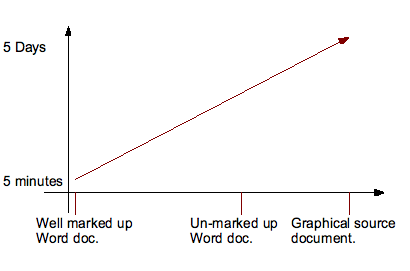
Creating an accessible PDF can take from a couple of minutes to several days.
A typical process in many organisations is:
- Person X creates a document in Word. They aren't part of the web team, so they send it to Person Y who is.
- Person Y knows about accessibility, and how to create accessible PDFs. But they are busy. They look at this 20 page document which does not use Word 'styles' or alternative texts, and realise that it will take over a day to sort out.
- Person Y has other work to be doing, and doesn't have time to correct the mistakes of Person X.
- Another inaccessible PDF is put up on the web.
The advice I give out in the policy advice section of Creating Accessible PDFs course is very rarely followed, usually because the person on the course doesn't have the influence required:
- Create a good Word template that includes all the styles required to follow the organisation's style guide. Also include anything else that people regularly use as well.
- Make this template available through the Windows domain (which most organisations seem to have).
- Make sure everyone knows about the benefits, such as easier maintenance of the document, and automatic create of table of contents. Make training available (or required) so people know how to use Word properly.
- Get your techies Windows domain expert to lock down the template, so you can only use the approved styles.
- Start rejecting anything that doesn't arrive using the template.
Unless the central team have the power to reject content that isn't done properly (or infinite time), the organisation won't change, and more inaccessible content will be added to the site.
CMS choice
Circling back to HTML content again, the same principle applies to the editing tool used within a CMS. Authors should only be able to apply formatting using the pre-defined styles, so the the editor within a CMS should be restricted.
Unfortunately there isn't a good WYSIWYG editor yet. By good, I mean produces accessible content by default, supports non-technical authors in doing so, and is accessible in itself. If XStandard were screen reader accessible I would use and recommend it, but I don't think it is yet (although keyboard accessibility has been added recently).
Since there isn't a good editor (and no, text areas are not good editors), if you are implementing a CMS or transition to a new CMS, be prepared to put some time into locking down the editor.
Your choice of CMS should be influenced by how well it supports inputing content accessibly, and how cleanly it stores the content. For example, a CMS that uses a JavaScript editor has to do a lot of work to get around browsers bad handling of HTML (they apply inline styling by default). Although that is the approach we use currently (on Defacto CMS), the content is stored as XML without inline styling, meaning the content is clean and accessible.
A good sign is if the CMS allows you to export all the content in XML, as it means it can be dealt with by scripts more easily if you decide to move CMS. Don't make the mistake of creating thousands of pages that you can only use with that CMS.
Meta data
I would be remiss not to mention metadata when talking about content. Although not my core interest, it's another thing that is best applied by an author at the time of content creation.
What type of metadata you would want to use varies from project to project, and depends what you want to do with it (e.g. improve and internal search, auto-generate navigation, or enable personalisation). Ideally, you would define what metadata you want to use upfront, and customise the CMS to make that easy.
Some things can be automatically applied (e.g. author), but some things are best done by authors at the time of content creation. For example, applying attributes to stories from an extendable controlled vocabulary. If you are using something to analyse a page and apply metadata automatically, you've probably missed the point or found that it's too late to apply it properly.
Responsibility for content
The responsibility for content on the web site inevitably comes down to the site owner. Although this is delegated to the developers in terms of site creation and configuration, and authors when adding content, it is too easy to make a wrong decision at the beginning. For example, choosing a CMS that doesn't support creating structured content, or not looking at the wider scope of content creation in other tools.
Whatever the tool, the responsibility of the site owner is to:
- Choose tools/products that support & enforce creating accessible, structured content.
- Choose tools/products that store the content cleanly.
- Make sure the developers are aware of these requirements from the start.
- Make sure authors know how and why they should use the structural elements properly.
- Don't enforce inaccessible practices (e.g. new windows for external links).
- If you upload Word or PDF documents to the site, make sure all content authors know how to create accessible Word documents, and a central web team person knows how to create and check accessible PDFs.
- Make sure that metadata is defined upfront, and that the interface for applying metadata makes it as easy as possible.
The bottom line is that without a decent editing tool or lots of training for motivated editors, the content will be rubbish to start with.
Technorati Tags:
- ← Previous
IA and accessibility - Next →
Office 2007 PDFs - Not (always) accessible